
CSP Management
Collect & Analyze CSP Violation Reports in Real-Time
Monitor your content security policy violations, identify vulnerabilities, and refine your policies — all from a single dashboard.
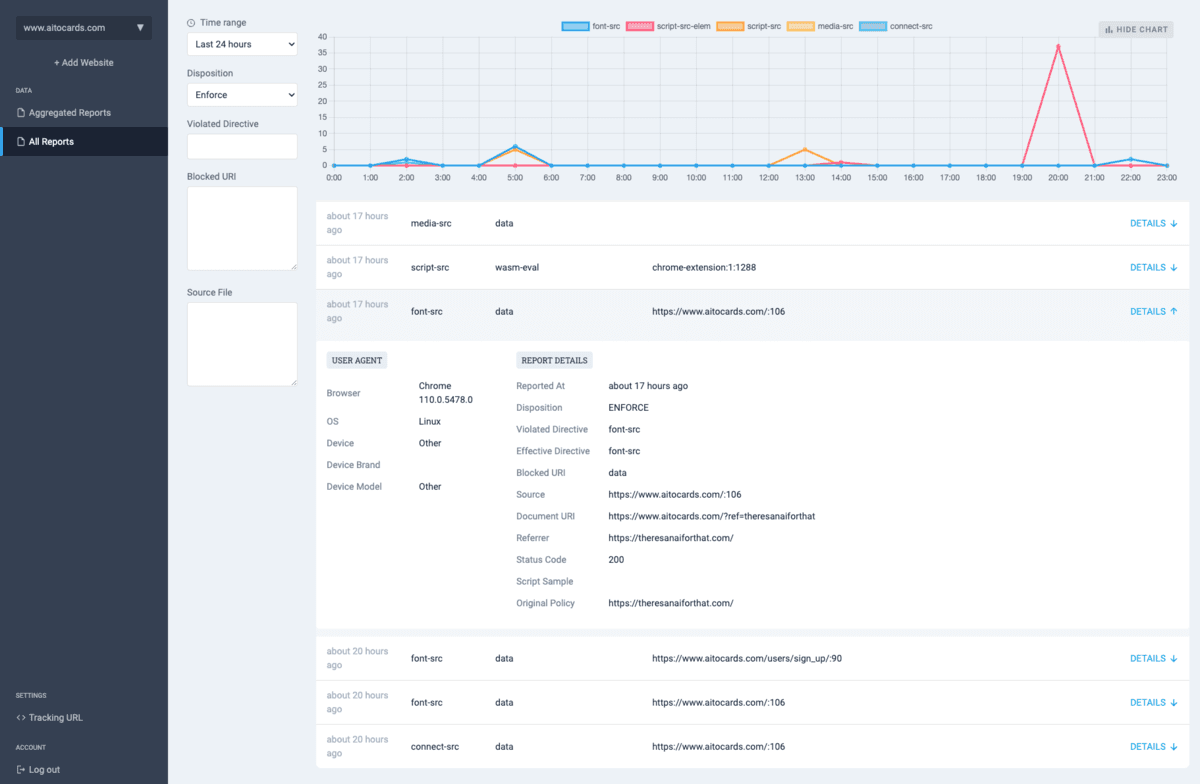
Why collect CSP reports?
Monitor Compliance
Understand how well your website adheres to its CSP. Especially useful for complex sites with many script and style sources.
Identify Vulnerabilities
Spot weak points in your code by analyzing violation patterns and common issues across your application.
Detect Attacks
Frequent violations from specific sources can indicate someone is trying to inject malicious content into your site.
Refine Policies
Start with a loose policy and iteratively tighten it as you learn which rules your application actually needs.
Pricing
Regular
- Unlimited domains
- Unlimited users
- 10,000 reports per month
- 3 months retention period
Free 7-day trial
From the Blog
Learn how to configure Content Security Policy in Django 6 using the new CSP middleware, including nonces for inline scripts and per-view overrides.
Let's learn how to configure a Content Security Policy in Next.js. We are to use nonces to allow inline scripts and styles, and a proxy to inject the nonce into the header.
Rails ships with CSP support but it's off by default. Learn how to enable it in content_security_policy.rb, set secure directives, use nonces, and handle report-only mode.
default-src 'self' isn't the safest CSP. Learn which directives you're missing, build the most secure content security policy step by step, and copy a production-ready header.
Step-by-step guide to removing 'unsafe-inline' from script-src and style-src. Use nonces, hashes, or external files to keep your CSP secure without breaking your site.
Copy-paste CSP directives for Google Fonts. Set style-src fonts.googleapis.com and font-src fonts.gstatic.com to load web fonts without breaking your content security policy.
Free Tools
Generate a Content Security Policy for your website with built-in best-practice validation.
Paste your CSP header to validate it and get actionable improvement suggestions.